
Computational Domain
Definition of the 3D region in which the solver tracks particles.
The computational domain defines the reference box for the simulation and contact search. Leaving this box does not necessarily delete a particle: that behaviour depends on the removal option described in 9.5. The domain is not a physical wall; use contact geometry to contain material. The Domain panel provides controls, dimensions/position and advanced min/max values.
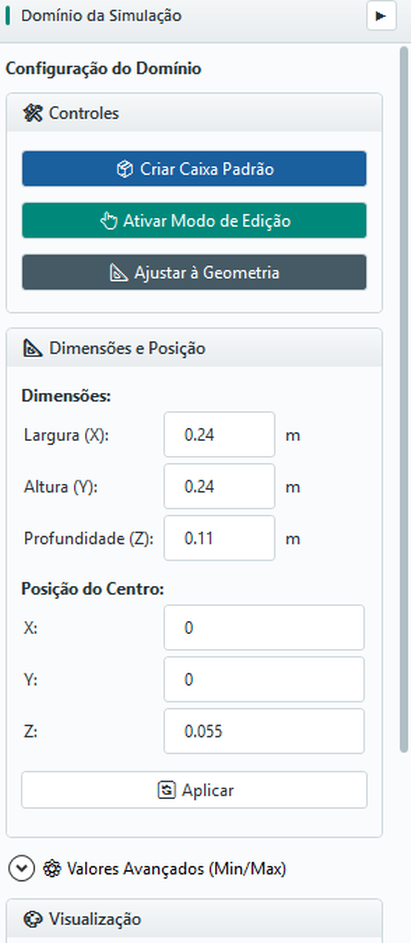
9.1 Create default box
Use Create Default Box to generate a conservative initial domain, based on the dimensions of the scene. Adjust it afterward to suit the case.
9.2 Adjust to geometry
The button Adjust to Geometry automatically sizes the domain around existing geometries, with a standard margin. Always review the margin after adjustment - in some cases it is necessary to add slack to the trajectory of particles ejected by the inlets positioned in the main geometry.
9.3 3D Edit Mode
Use Enable Edit Mode to manipulate the domain visually, dragging the faces in the viewport. After editing, check the numerical values to avoid small inconsistencies introduced by drag.
9.4 Dimensions and centre
The domain is defined by Width X, Height Y, Depth Z and centre position (cx, c y, c z). Alternatively, it can be defined by the minimum and maximum limits in the advanced expander.
9.5 Particles leaving the domain
In the Domain panel, expand Remove particles outside the domain. The Remove particles that leave the domain option controls whether those particles are deleted from the simulated population.
| Control / state | Effect |
|---|---|
| Checked | Enables periodic deletion of moving particles beyond the removal limits. The GUI initially has this option checked. |
| Unchecked | Disables domain-based deletion: leaving the box alone does not remove a particle. Configured outlets retain their own removal rule. |
| Check every (steps) | Interval between checks, in integration steps. The initial value is 500; it is not an interval in seconds. |
Deletion does not occur exactly when the drawn face is crossed: checking is periodic and uses an outer margin of four times the configured maximum radius. A particle may therefore appear beyond the box before deletion. Once removed, it no longer participates in contacts or the active population.
9.6 Good domain practice
- Contain all geometry, including moving parts to their maximum extent;
- Contain all the expected trajectory of the particles;
- Leave enough margin for ejected particles in strong collisions;
- Do not make the domain unnecessarily large - oversized domains impair performance;
- Maintain consistency with the unit system (SI: meters).